Waiting for equipment
The ONU reboots, the router is not switched on right away, the OLT answers with a delay. The system waits for the required state within a time limit and continues by itself when it arrives.
Project · internet provider network
I started building the portal on my own initiative. I wanted to get rid of repetitive manual work and the constant calls from installers: find the equipment, check the connection, register a device, figure out why a subscriber has no internet.
Over time the project grew into a system staff use to monitor the network and to connect and serve subscribers. It brings together an interactive map, equipment status, diagnostics, billing work, outages, requests and notifications. Staff handle routine tasks themselves, while the automation guides each operation and checks the result.
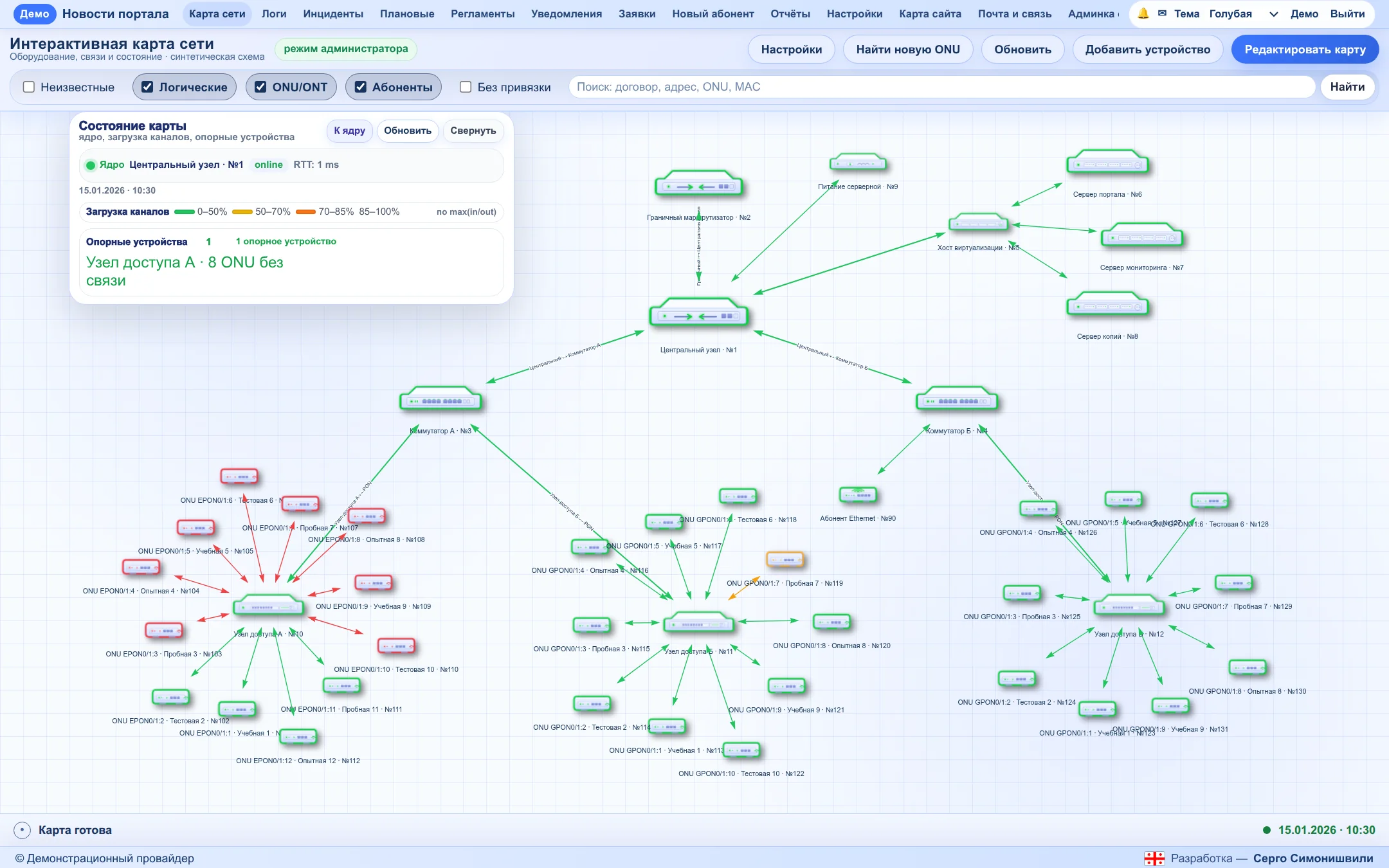
The interface in the illustrations is real. In the portal screenshots, subscribers, contracts, addresses, MAC and IP addresses, equipment names and the network layout were replaced with demo data before capture. The Cacti graphs show real metrics with anonymised names. The MAX messages are real, with identifying data replaced.
Twelve areas of work with the network and subscribers. A short note on each below; three working scenarios are covered in detail further on.
Equipment and links, including those found from device neighbour data. ONUs are grouped around their OLTs. Node and line status updates automatically from monitoring data. A subscriber can be found by contract, address, MAC or ONU, with a jump to the device and the port they are connected to.
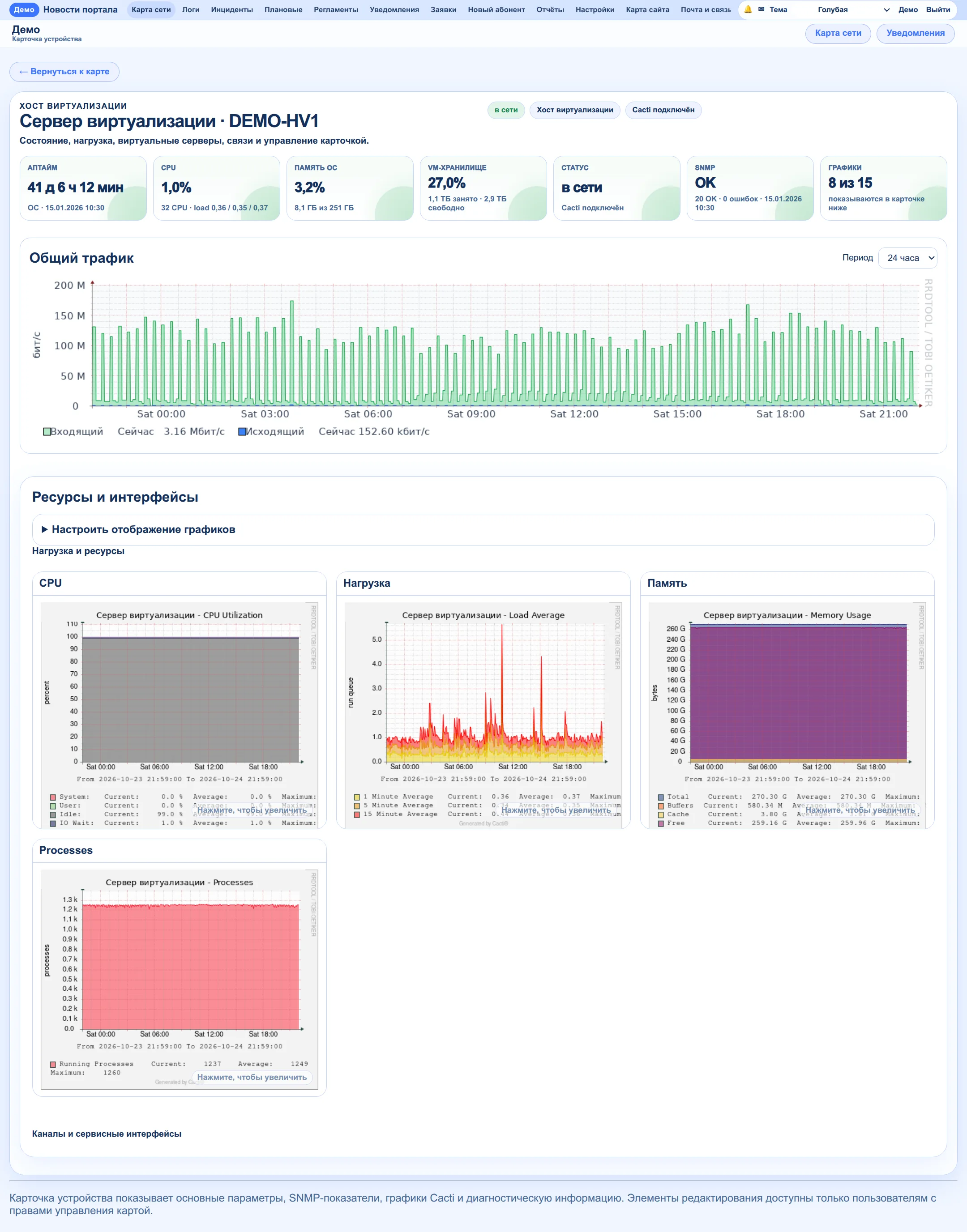
In-house SNMP polling based on metric templates: availability, optical levels, link load, server CPU, memory and disks. Power for OLTs and the server room is watched separately; frequent switching is recognised as instability rather than a series of new outages.
The add-device wizard registers the device in Cacti from a profile, and the portal then shows its graphs in the equipment card. Building graphs in the portal itself is the next step.
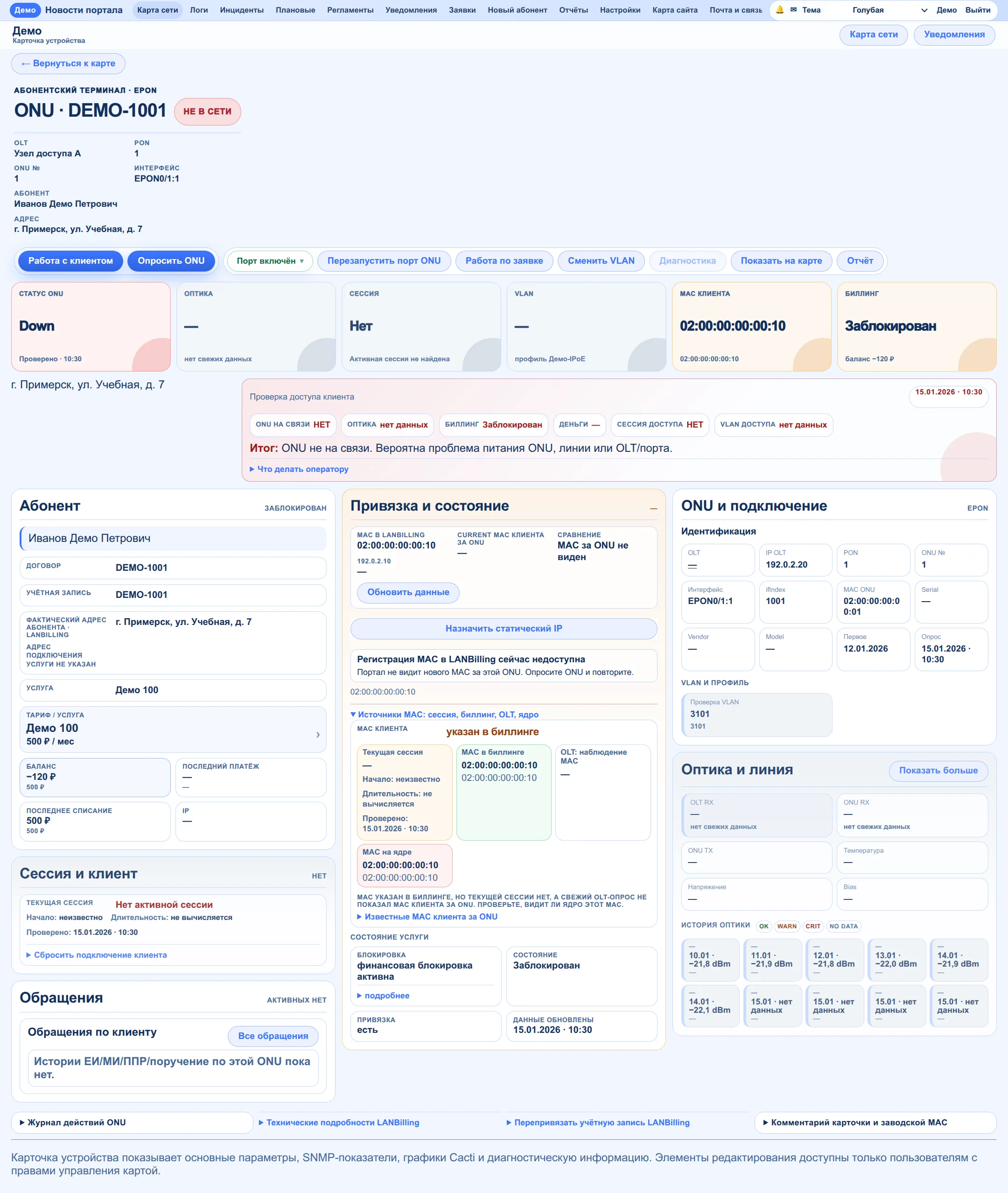
One card holds the contract, balance, tariff, equipment, optics, MAC from several sources, connection point and session. The check shows which link in the chain is broken and offers actions to restore the connection.
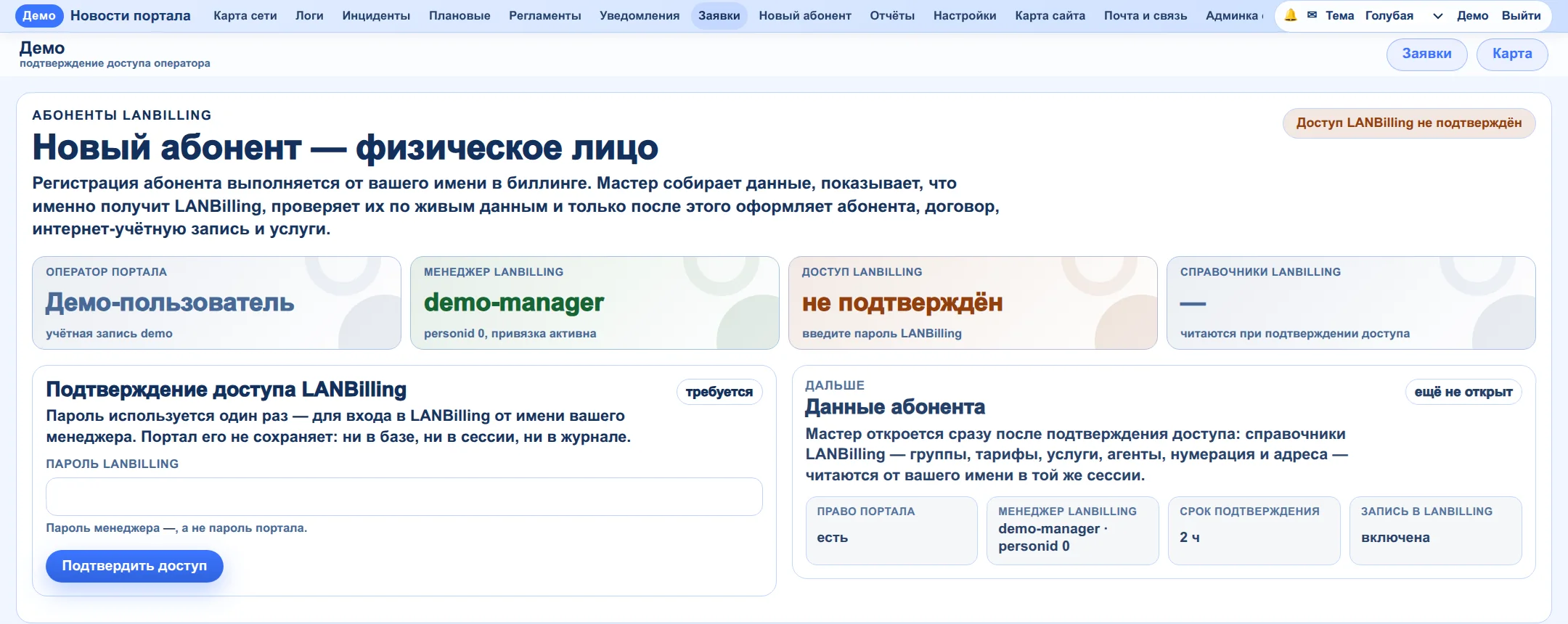
Detecting a new ONU, temporary installation internet, binding to the subscriber, configuration, registering the router MAC and checking the session. ONU replacement with the account moved to the new device.
Creating a subscriber: contract, internet account, tariff and services — with a preview and a check after every write. Registering and replacing MACs, resetting sessions. Reports on payments, charges and data quality with export.
Related disconnections are merged into one mass outage with a history. You can see how many devices came back online and which are still unreachable. Subscriber requests and work orders are assigned to staff with notifications.
Staff receive notifications about equipment, outages and requests in MAX. An installer goes through the connection step by step right in the chat with the bot. The portal also has a mobile version.
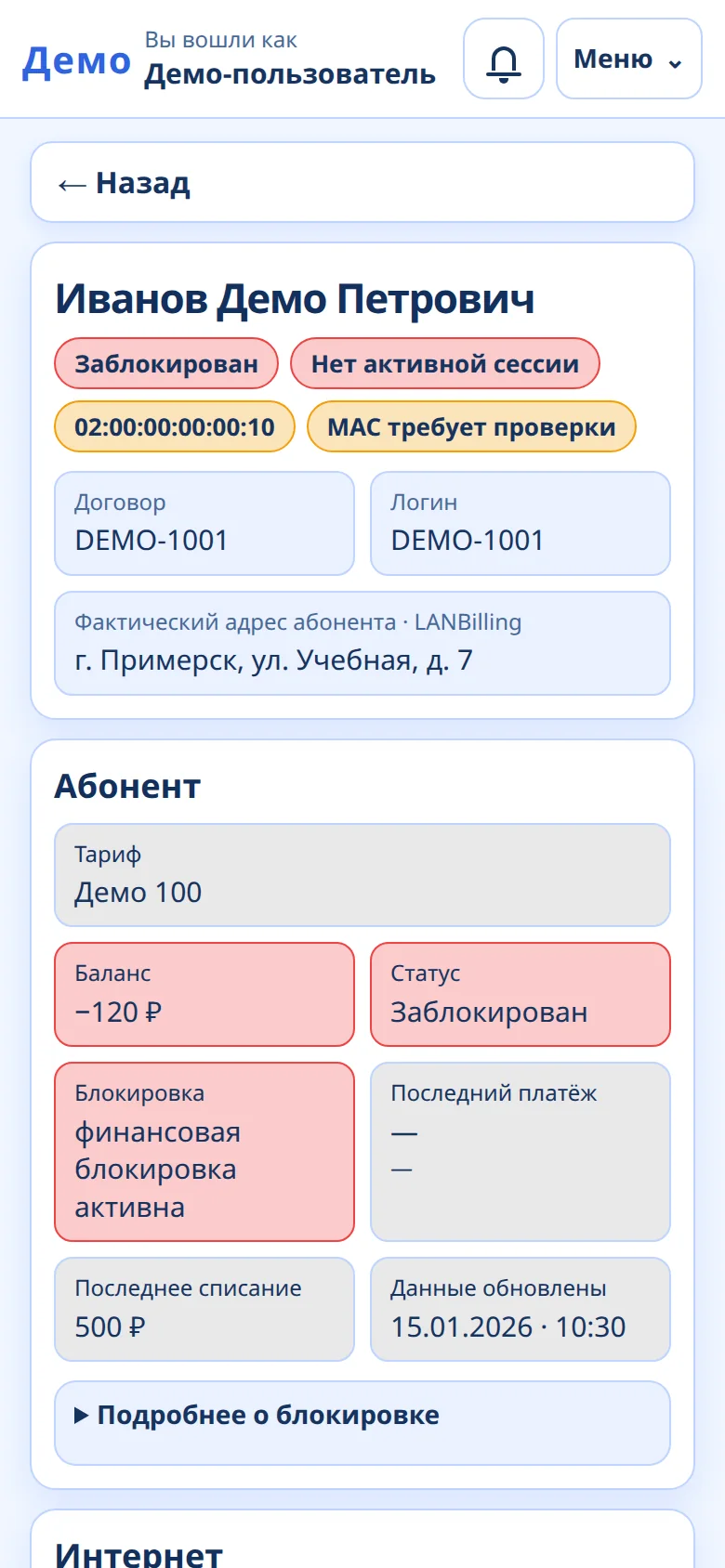
Sign-in with personal account credentials, balance, deferred payment, announcements, reporting a problem with connection diagnostics, and inviting friends through the referral programme.
Equipment events, staff actions, sign-ins and the network audit log — with search and filters. Analysis of network storms by traffic signatures, outage materials and an exportable report.
Scheduled background jobs with their latest result, checks that configuration backups are fresh, an inventory of servers and virtual machines linked to physical hosts. An external service watches the availability of the portal and the network core and notifies staff itself if the portal is down.
Roles and permissions for individual operations, access requests with approval, single sign-on and a shared staff directory for company services. That is why an installer can be trusted to connect a subscriber without administrative rights on the equipment.
Scenario 1
The installer is on site: the line is in and a new ONU is powered on. This used to be the moment the calls to the administrator started — find the device, provision it, check that everything works.
Every step ends by reading the actual state: profile applied, configuration saved, MAC matches, session present. Pressing a button does not count as a result.
The process stops with a clear reason, and the installer can pass the request to an administrator right from the chat. Installations are often interrupted — the router is not ready, the subscriber is not home — so the stages are saved and the work can resume later from the same point.
MAX Staff bot · ONU connection
Scenario 2
A subscriber calls: no internet. The cause can be anywhere — ONU power, the line, the port, the balance, the router or the session.
After an action the card reads the state again and shows what changed. The automation does not identify every fault — it narrows the search quickly and rules out what has already been checked.
If the connection is not restored, a request is prepared from the card with the data already collected, and the engineer goes on site knowing what has been checked.
Scenario 3
A cable is damaged: several subscribers on one PON lose connection almost at once. Handling every disconnection separately would bury staff in notifications.
After the repair the portal marks each ONU that comes back and records in the history how many are restored and how many are still offline. The outage closes only after two successful polling cycles in a row.
ONUs that never came back are not lost when the outage closes: they stay as separate problems. If the connection drops again before closing, the outage continues instead of being duplicated.
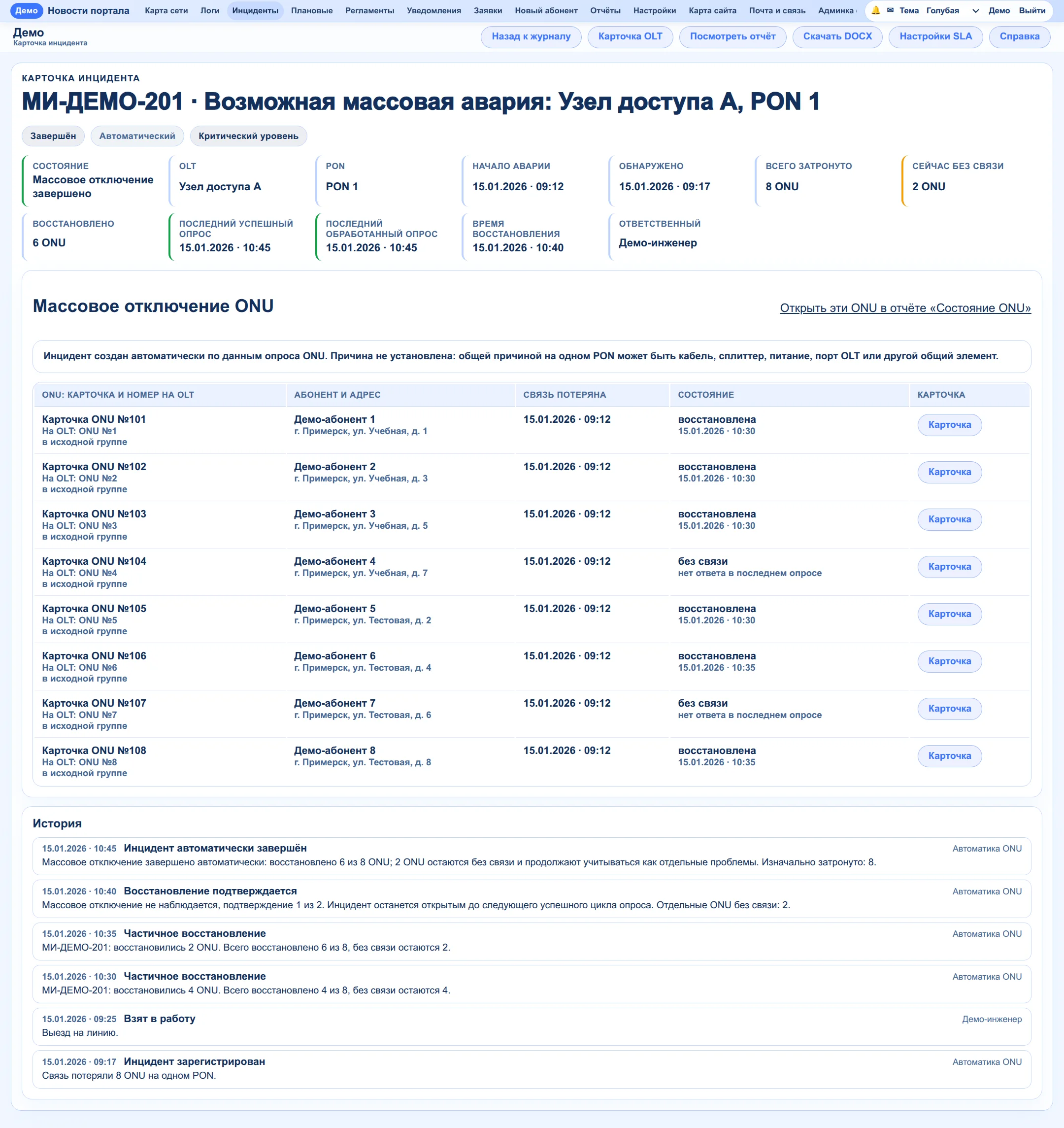
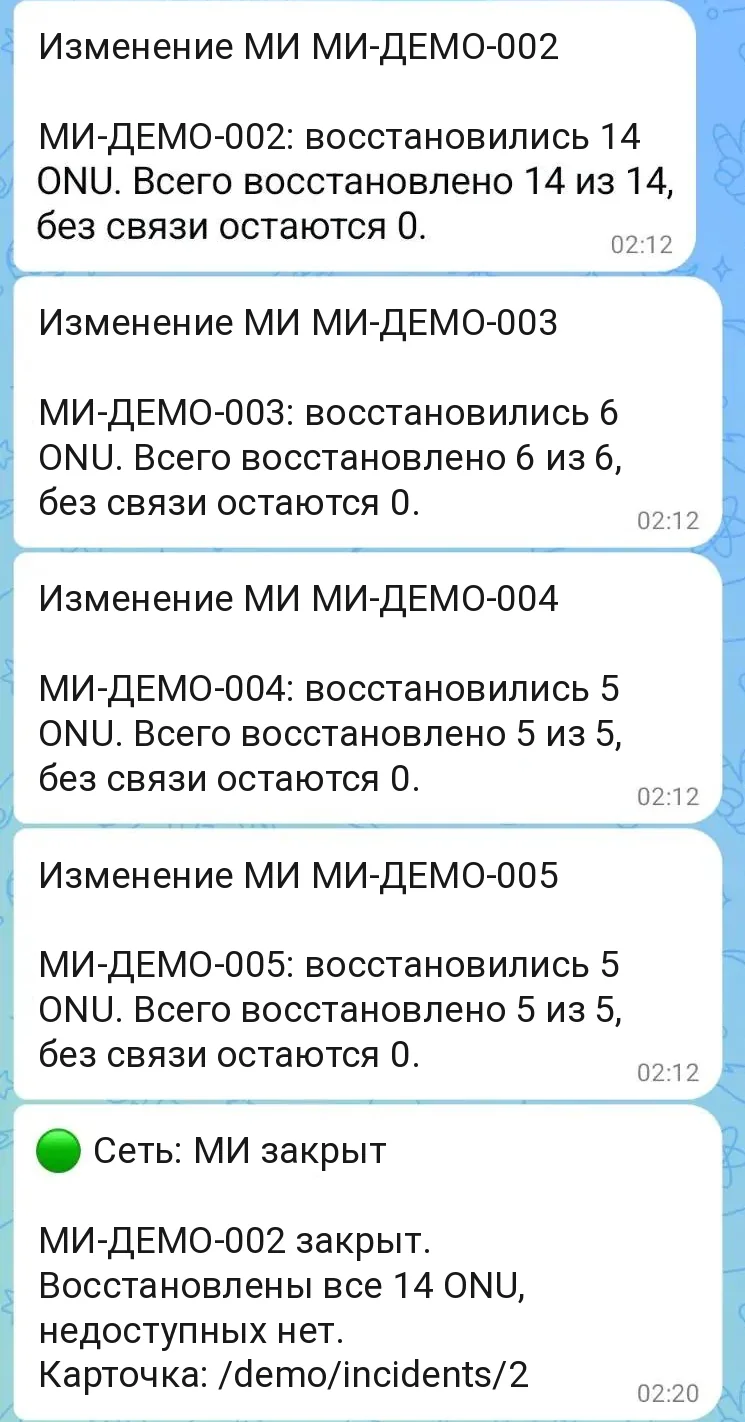
Staff get a message for each affected group of ONUs: how many came back and how many are still offline. Then a message reports that the incident is closed.
The portal itself writes to staff in MAX: about server-room power, mass outages and new requests. Below are real messages from the service bot.
The portal reads telemetry from the battery-backed inverter. When external power is lost, the bot reports that the equipment is running on batteries and sends the current readings. Remaining runtime is not forecast until enough discharge measurements have been collected.
Voltage at the input does not yet prove that the equipment is powered externally again. The portal shows the intermediate state and keeps the outage open until a repeat reading confirms the switch to external power; then a message arrives with the outage duration. The source — mains or generator — cannot be determined from telemetry, and the bot says so plainly.
A new connection request from the website reaches staff at once: source, contact, address and the tariff of interest, with a button that opens the request. Above it in the feed, another mass outage is restored and closed.
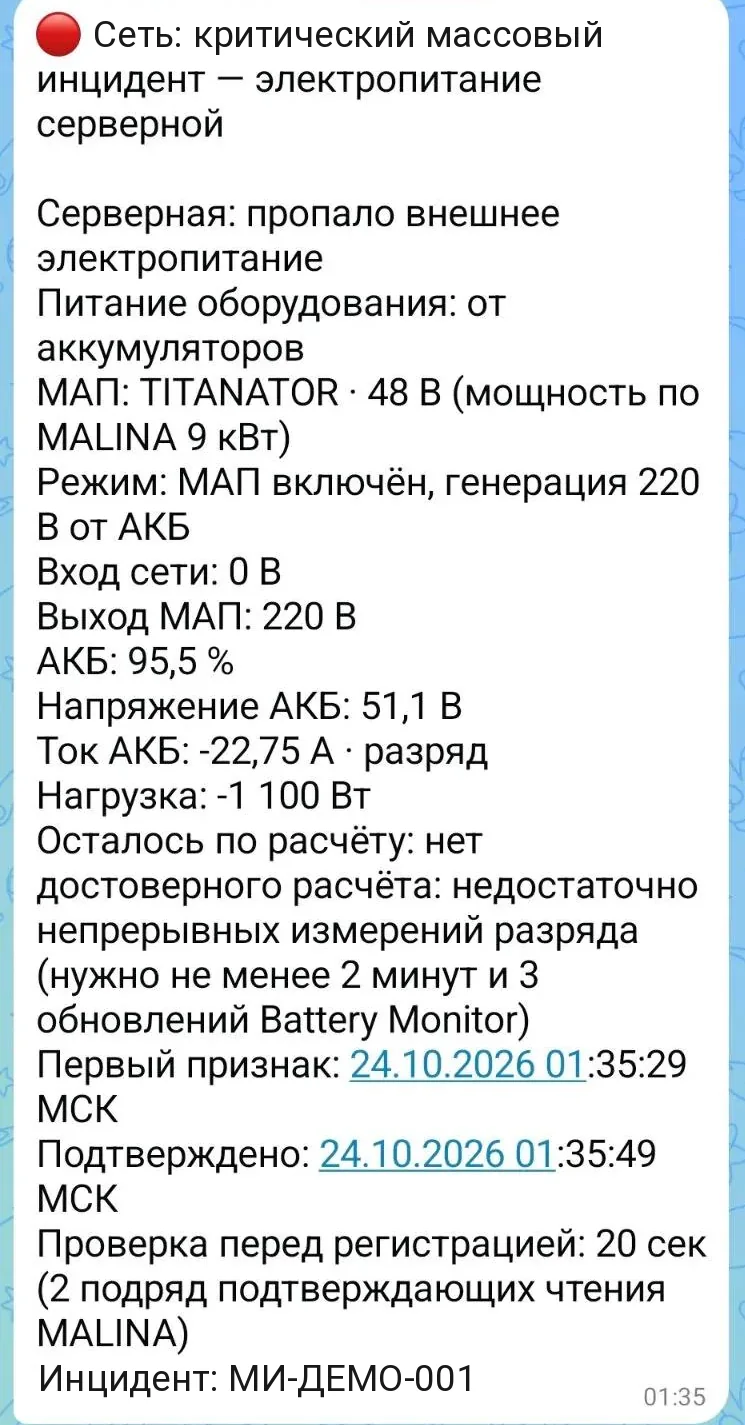
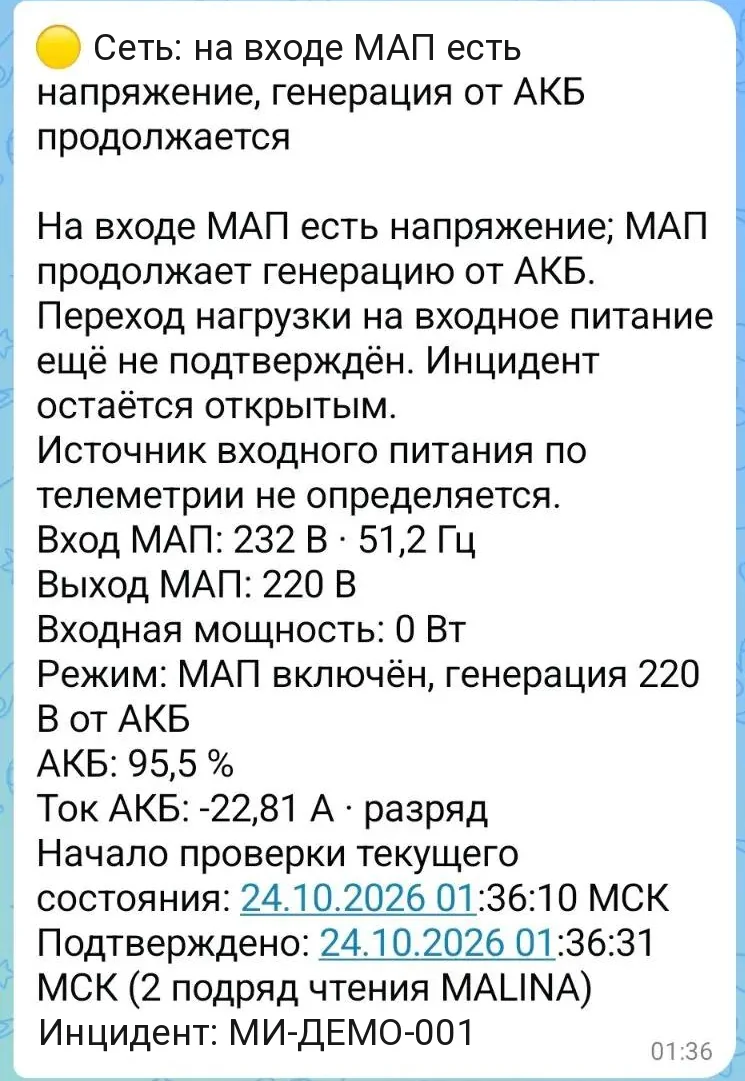
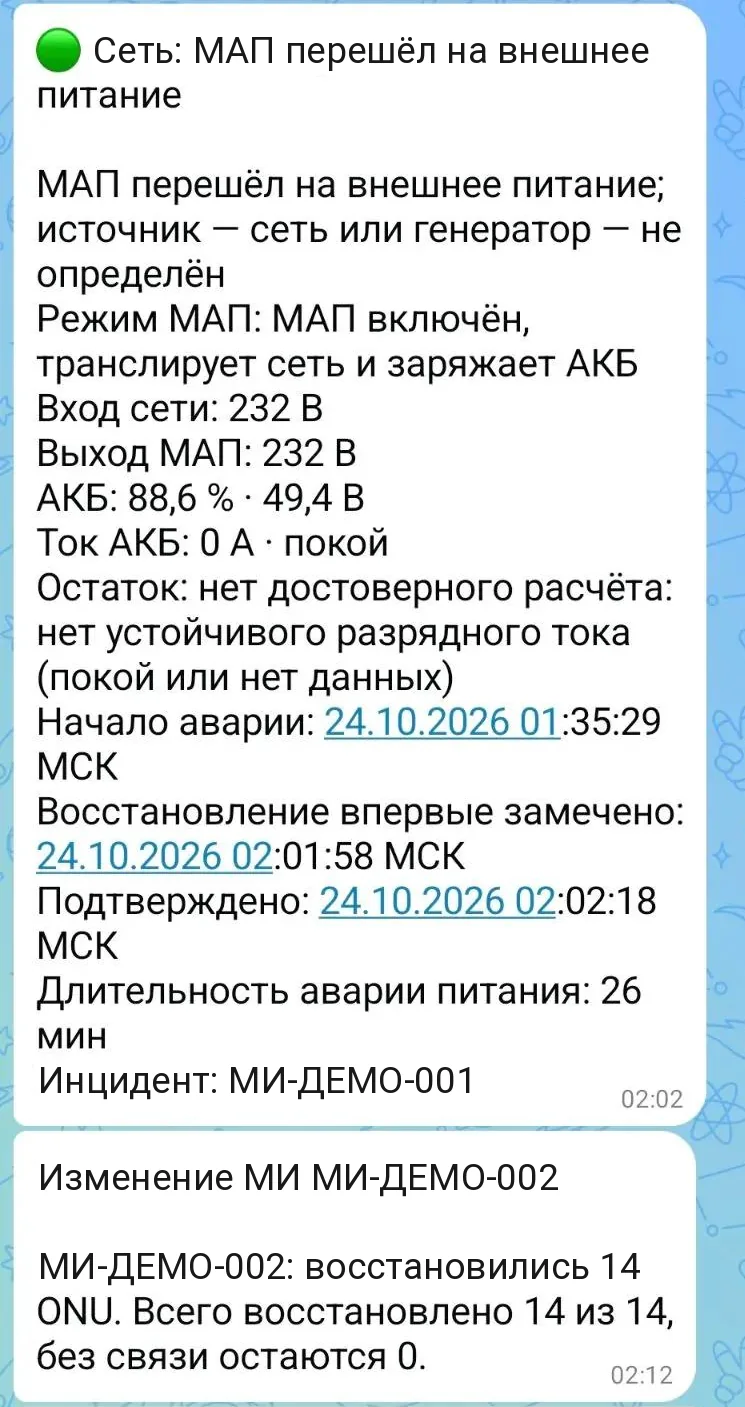
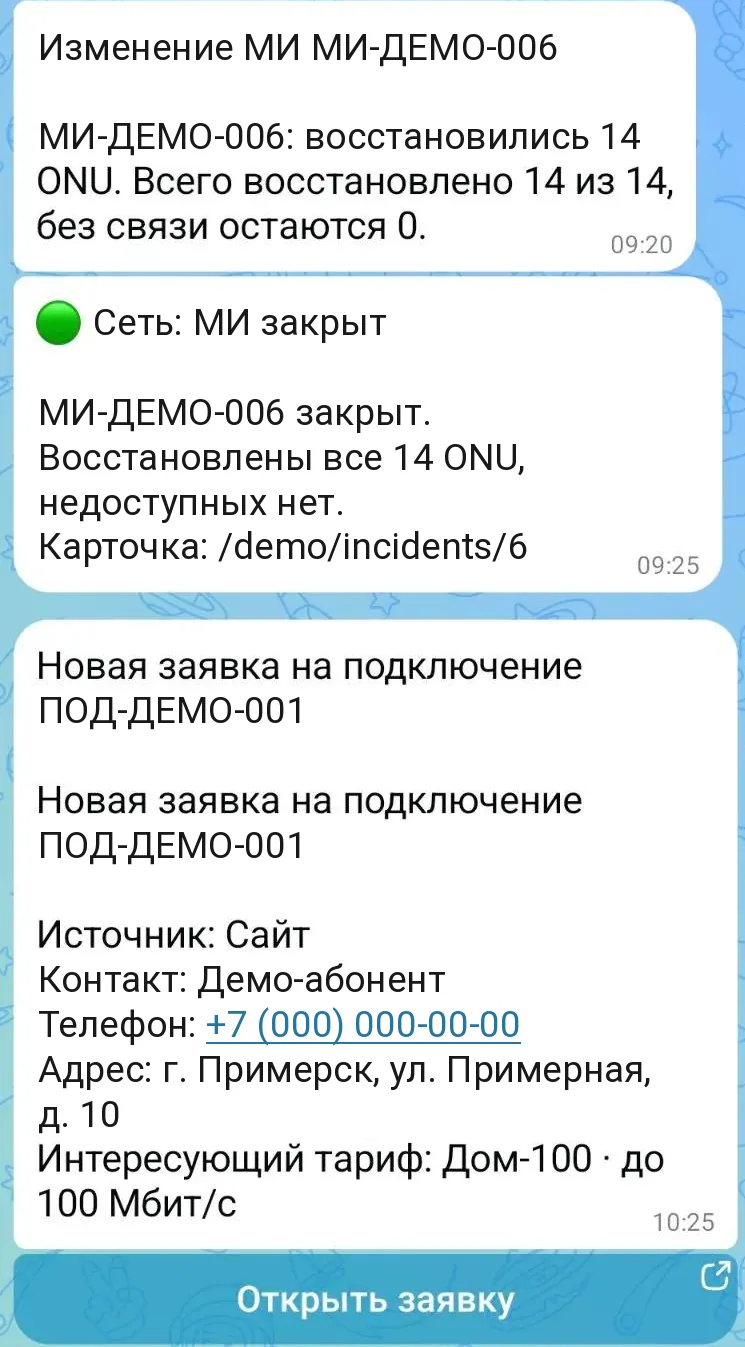
Real messages in MAX. Identifying data replaced. The messages are in Russian.
Equipment polling, metric templates, assessing availability, optics, load and resources, outage and notification rules are the portal's own logic. External systems supply what does not need to be repeated: Cacti graphs, billing directories and operations, and the library that draws the map.
The portal works with Cacti both ways: the add-device wizard registers the device in Cacti from a profile, and the graphs then open right in the equipment card. Next I plan to build the graphs in the portal itself.
For this provider the portal covers a large part of the work usually done by Zabbix, Cacti, Nagios and similar systems: polling equipment, tracking status, topology, events and notifications. Connecting and serving subscribers happens in the same place. It does not replace every feature of those products.
The portal changes settings on real equipment and records in billing. So every operation is built to be interrupted, repeated and examined afterwards.
The ONU reboots, the router is not switched on right away, the OLT answers with a delay. The system waits for the required state within a time limit and continues by itself when it arrives.
Completed stages are recorded. If the connection drops or the installer leaves, the work continues from the same point instead of starting over.
Success means a state that was read back: an applied profile, a saved configuration, a found MAC, a session that appeared. A "command sent" reply does not count as success.
A repeated press or a repeated message delivery returns the result of the same operation. No second subscriber, second MAC record or second outage appears.
If some steps are done and the next one is not confirmed, the operation stops with a clear reason. An unknown result is never reported as success and does not trigger the action again.
Every action by staff and by the automation goes into a log. From it you can reconstruct what happened, in what order and who did it.
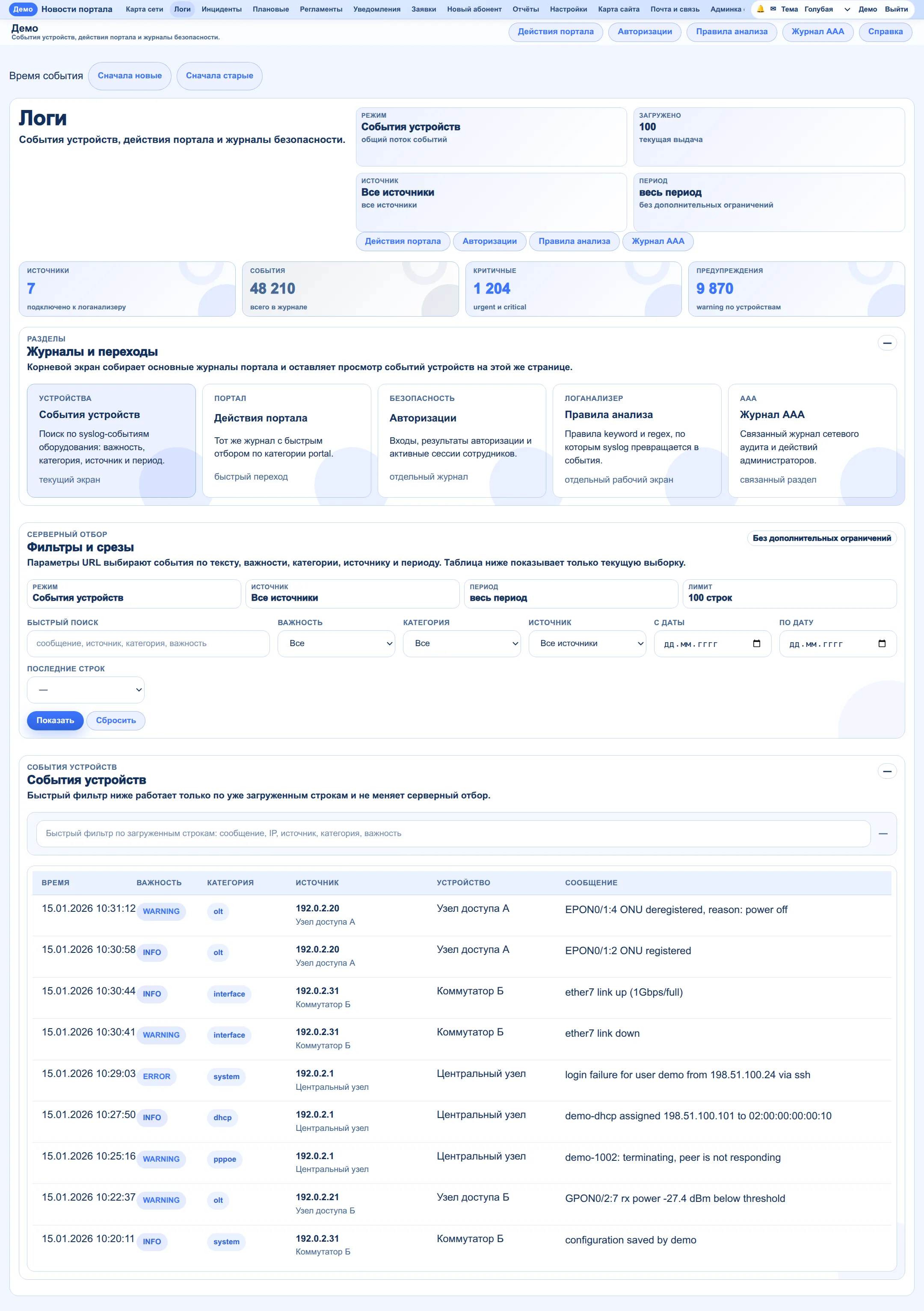
Equipment sends events to the portal, and staff search them by text, severity, category, source and period. Next to them are staff actions in the portal, sign-ins and the network audit log.
If a problem repeats, the portal continues the same outage record instead of creating a new one for every trigger. For network storms there is an analysis of traffic signatures, and materials can be attached to an outage and a report exported.
Some parts of the portal deserve a closer look. In these notes I explain why each mechanism was needed, how it works, where development got difficult and what came out of it.
Coming next: optical network monitoring, detecting mass outages, notifications and incident handling, equipment inventory and network topology, and automating everyday operations. I add them as they are ready.
The system is running and I keep developing it. Below are plans: these features do not exist yet.
Planned
In the field mobile internet is often limited, and a messenger stays more reachable than web pages. So the main priority is to move more everyday operations into MAX. Some are already there: notifications and the connection scenario.
Planned
Build graphs from the portal's own polling data instead of only showing Cacti graphs.
Planned
For now the section only describes its purpose: which subscribers and sites are affected according to the links on the map. The calculation itself is still to be built.